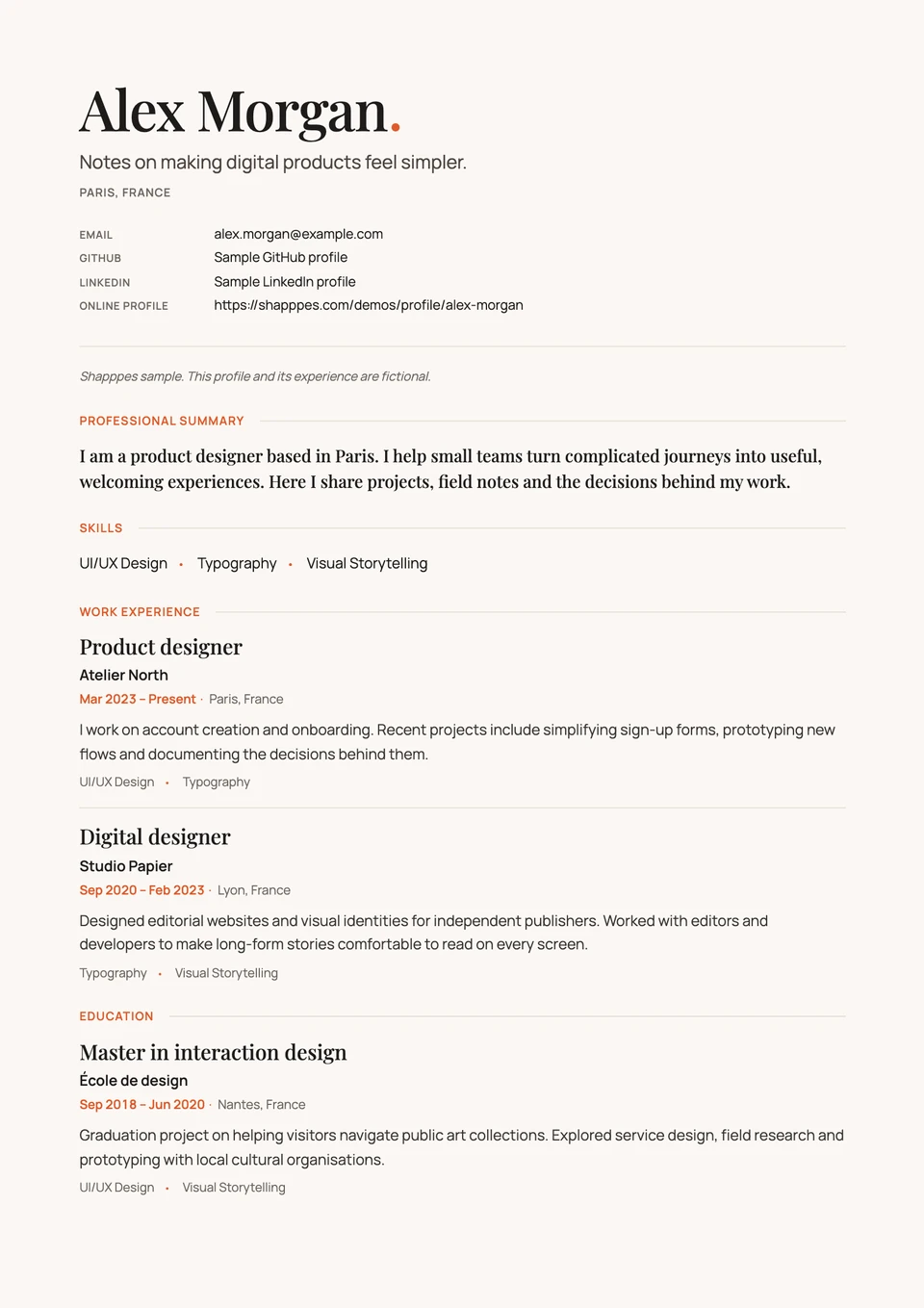
Product designer
Atelier North Mar 2023 to present
I work on account creation and onboarding. Recent projects include simplifying sign-up forms, prototyping new flows and documenting the decisions behind them.
- UI/UX design
- Typography

Add your experience and skills once. Use them for your professional profile, personal website and PDF CV. Publish articles and case studies when you have more to share.
Free profile, website and PDF CV.
Explore a professional profile, a personal website and a CV built with Shapppes. Update your profile in one place, then generate a new PDF whenever you need one.
Explore website designs
Start with your professional profile. It supplies the content for your website and each CV you generate.
Your roles, education and skills belong together. Link a case study when a short description needs more context.
Share your profile, choose a website design or generate a PDF CV. Articles are there whenever you want to publish.
Explain what you worked on, the skills you used and what you learned. Add your education, and attach a case study to the relevant role or course when there is more to explain.
Explore an example profileAtelier North Mar 2023 to present
I work on account creation and onboarding. Recent projects include simplifying sign-up forms, prototyping new flows and documenting the decisions behind them.
Before the result comes a question to work through. Constraints to consider, a first approach, then another. Often, that is where your real contribution to the project takes shape.
Tell the story from the beginning. What surprised you, the decision that moved things forward, what you would do differently today. Following your thinking helps people understand how you work.
A case study can build on a role or a course on your profile. It gives you room for the experiments, choices and details that a short description leaves out.
Take your time in an editor that leaves room for the words. Save a draft, come back to it, publish when you are ready. Your article joins your profile and your website, alongside the rest of your experience.
Keep using LinkedIn and the other platforms that matter to you. Use Shapppes to bring your experience, case studies and writing together, then share the result as a profile or personal website.
| What you get | Medium | dev.to |  | |
|---|---|---|---|---|
| A structured professional profile | Partial. Bio and About page | Partial. Bio, skills and links | Included. Experience, education and skills | Included. Show the skills behind each role.Add your experience and education, with the skills you used in each. |
| Articles on your profile | Included. Articles and publications | Included. Articles for developers | Included. Posts and articles | Included. One article on your profile and your site.Write it once. The same article also appears in the Shapppes feed. |
| Projects linked to your experience | Not built in. Projects described in articles | Not built in. Projects described in articles | Included. Links and media attached to roles | Included. Explain what you contributed.Attach a case study to the relevant role or education entry. Describe the problem, your decisions and your part in the work. |
| A portfolio built from your profile | Not built in. No built-in portfolio | Not built in. No built-in portfolio | Not built in. No built-in portfolio site | Included. A portfolio without entering everything again.Pick a design. Your experience and published articles already make up your site. |
| A PDF CV generated from your profile | Not built in. No generated CV | Not built in. No generated CV | Partial. Account-dependent, in English on desktop | Included. A CV ready to send.Generate a PDF from your professional profile. |
| Update your profile and site together | Partial. Articles shared across profile and publications | Not built in. Maintain an external site | Not built in. Maintain an external site | Included. Change it once. Your site follows.Your site uses the same updated content, without copying it between tools. |
| Altogether | Three profiles to keep up to date | One profile.One place to update your profile and site. | ||

Make your website, CV and profile feel unmistakably yours.
And more
Your profile and writing are free.
No. You can share your professional profile and let visitors download your PDF CV without publishing an article or choosing a Portal. Add articles or case studies whenever you want to explain a project or share something from your field.
Your personal site. You choose a portfolio or blog design, and it shows your profile and published articles at a Shapppes address, such as alex-morgan.shapppes.com.
Your profile, articles, PDF CV and Portal with the free designs are free. Plus adds more designs with their own settings, CV layouts that match them, your own domain and widgets. See the Plus page for monthly and yearly prices.
Nothing is deleted. Plus runs until the end of the period you paid for. Then your Portal switches to a free design and visitors stop seeing your widgets. Your Portal stays at its Shapppes address, and your own domain redirects there for 30 days before it is disconnected. Your Plus design, widgets and settings are kept, and they come back if you subscribe again.
Your profile and published articles. Drafts stay private until you publish them, and edits to a published article stay in its draft until you choose Publish changes. You can also keep a certification private. What you're looking for can be shown only to signed-in members, or hidden from members at your current companies.
AI is optional. Your articles stay exactly as you wrote them. It can choose topics you have not selected and prepare the short summary shown in the feed after publication. If you add a language, it prepares a translation for you to review. These features use OpenAI, which receives the text of the article concerned. You can turn them off in Settings › AI features.
Yes. Open Settings › Your data and click "Download your data". You get a ZIP archive with your full profile, as JSON and in the JSON Resume format, and every article and draft as Markdown with its images. Your account stays open and untouched. To leave, delete your account in Settings › Details. Your profile, Portal and writing are removed at once. If you have Plus, it stops immediately and the current period isn't refunded.
Yes, from Medium. Ask Medium for your export, then choose Import from Medium in your profile's Drafts tab and add the ZIP. You pick the stories, and only those leave your browser. Each one becomes a draft, with its images, that you can edit before publishing.
Yes. Add your Shapppes address to your LinkedIn profile, and keep on Shapppes what has no room on LinkedIn, such as case studies and long articles.
Create your free account with your email address.Create a free profile